
Hardware · Troubleshooting
Epson TM-U220 error lights and what they mean
Read the blinking ERROR light on an Epson TM-U220 kitchen printer to tell which faults clear themselves, which clear after you fix something, and which need a replacement printer.
Epson TM-U220
Epson TM-U220 error lights and what they mean
Reading the ERROR light on a TM-U220 kitchen printer
When something is wrong with an Epson TM-U220, the printer stops printing, goes offline and blinks the ERROR light on the top of the case. The pattern of the blinks says what is wrong. Use it to tell whether the printer will recover on its own, whether you can clear the fault yourself, or whether the printer has to be replaced.
On this page
- Faults that clear themselves
- Faults you can clear
- Faults that cannot be cleared
- Need help?
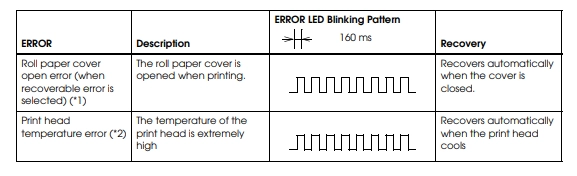
Faults that clear themselves
These stop the printer until the condition goes away, and then it carries on by itself. Nothing needs resetting.
Roll paper cover open. The paper cover was opened while the printer was printing. Close the cover and printing continues.
Print head temperature. The print head has become extremely hot. The printer starts again on its own once the head has cooled.
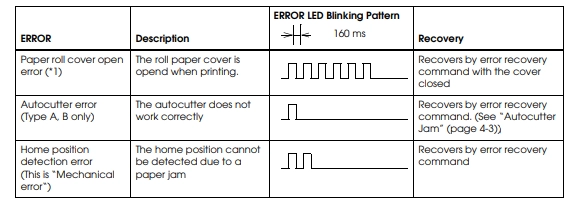
Faults you can clear
These stay until somebody fixes the cause, and the printer then recovers.
Paper roll cover open error. The cover was open while printing. Close it.
Autocutter error. The cutter is not working, usually because it has jammed part way through a cut.
Home position detection error. The print head cannot find its home position, which almost always means a paper jam. Clear the jam.
If the printer does not come back after you have cleared the cause, turn it off at the switch, wait a few seconds and turn it on again.
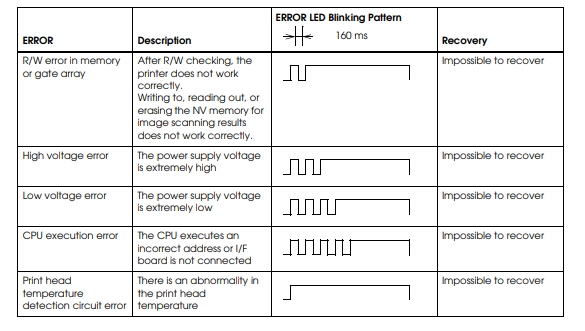
Faults that cannot be cleared
These are hardware faults. The printer will not come back, whatever you do to it, and it has to be swapped out.
Memory or gate array error. The printer fails its own memory check.
High voltage or low voltage error. The supply voltage is out of range.
CPU execution error. The printer's processor has faulted, or an interface board is not connected.
Print head temperature detection circuit error. The sensor that watches the print head's temperature has failed.
A printer in this last group is not worth troubleshooting
Power cycling will not clear a hardware fault. Log a job with Triniteq support so a replacement can be arranged.
Epson's own TM-U220 Technical Reference Guide has the full list of patterns and timings.
Help
Need help?
Triniteq support
Our support team is here to help.
Call 1300 784 276 or email support@triniteq.com, and include your venue name so we can find your setup straight away.