
Integrations · Guide
Sending PowerEPOS sales to Restoke
Find your Restoke API key and ask Triniteq to switch on the direct integration, so sales and product configuration go to Restoke over the API instead of as a nightly CSV.
PowerEPOS + Restoke
Sending PowerEPOS sales to Restoke
PowerEPOS and Restoke, over the API
PowerEPOS used to send sales to Restoke as CSV files. It now talks to Restoke directly over their API, which sends itemised sales transactions and a full product configuration export — sales modifiers, PLU prices and product groups — rather than a summary.
In this guide
- StartBefore you start
- 1Open your Restoke settings
- 2Copy your API key
- 3Ask Triniteq to switch it on
- 4Need help?
Start
Before you start
- A Restoke account you can sign in to.
- The date you want the integration to start from.
Step 1
Open your Restoke settings
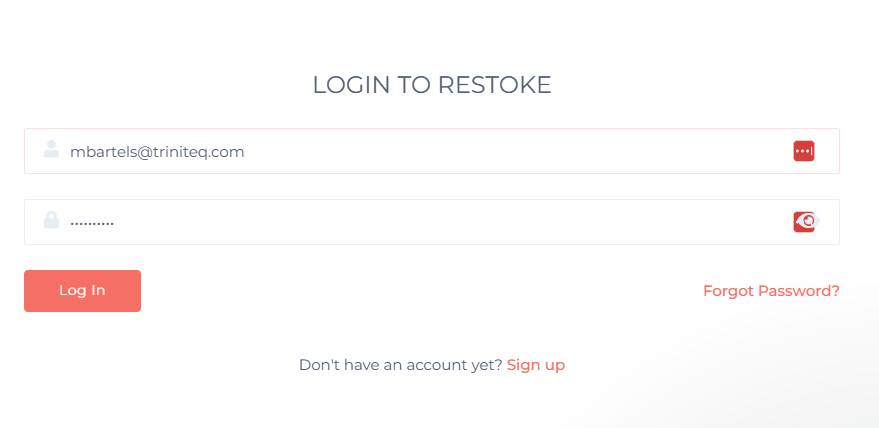
Sign in to Restoke and go to Settings → Restoke Settings.

Step 2
Copy your API key
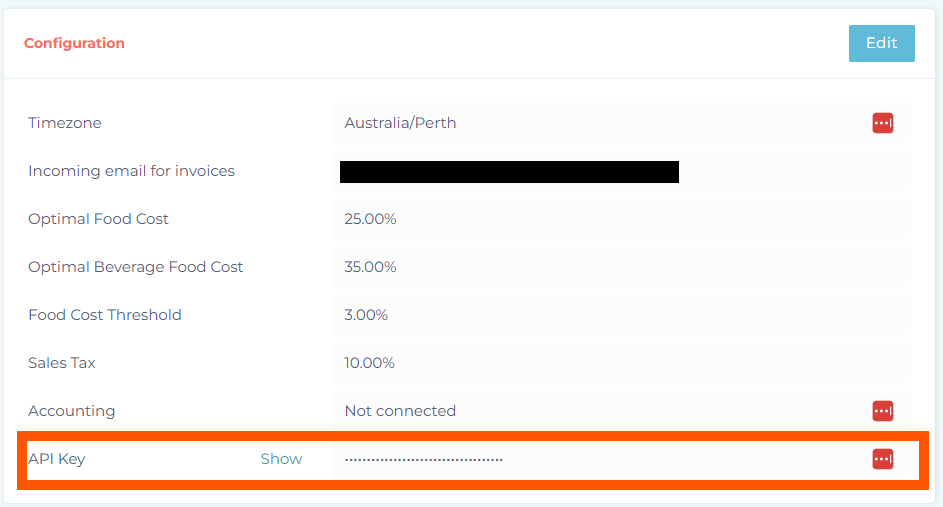
Under Configuration, find your API key.
Step 3
Ask Triniteq to switch it on
Raise a ticket with Triniteq support and include your venue name, your Restoke API key and the date you would like the integration activated from.
Triniteq confirms the activation by email. Your sales and configuration data then appear in the Restoke portal. For help using that data once it is there, Restoke's own support team is the one to ask.
Step 4
Need help?
Triniteq support
Our support team is here to help.
Call 1300 784 276 or email support@triniteq.com, and include your venue name so we can find your setup straight away.